WCF changes way of communication between application-to-application and intra-application. This post will help you to call WCF from iPhone application. First we will see what we have to do on WCF to let iPhone application call service. And the sample code which call WCF from iPhone.
First let’s create simple WCF service.
[ServiceContract(Namespace = "")]
[DataContractFormat]
public class MultiEndPointsService
{
[OperationContract]
public string GetDictionary()
{
Dictionary<string, string> dict = new Dictionary<string, string>();
dict.Add("IB", "Imran Bhadelia");
dict.Add("DO", "David Oliver");
dict.Add("NA", "Nick Althoff");
dict.Add("JJ", "Jay Joshi");
dict.Add("DL", "Dave Larson");
dict.Add("BA", "Brenda Ayong-Chee");
dict.Add("JP", "Jay Parikh");
StringBuilder sbJson = new StringBuilder();
new JavaScriptSerializer().Serialize(dict, sbJson);
return sbJson.ToString();
}
}
This is simple WCF Service. We need to add some decoration for enabling web script and handle POST method. We are going to send http post form iPhone application and send Json string as response. Doing so we also need to decorate our operation contract to set request and response format.
[ServiceContract(Namespace = "")]
[AspNetCompatibilityRequirements(RequirementsMode = AspNetCompatibilityRequirementsMode.Allowed)]
[ServiceBehaviorAttribute(IncludeExceptionDetailInFaults = true)]
[DataContractFormat(Style = OperationFormatStyle.Document)]
public class MultiEndPointsService
{
    [WebInvoke(Method = "POST", BodyStyle = WebMessageBodyStyle.WrappedRequest,
        RequestFormat = WebMessageFormat.Xml, ResponseFormat = WebMessageFormat.Json)]
    [OperationContract]
    public string GetDictionary()
    {
        Dictionary<string, string> dict = new Dictionary<string, string>();
        dict.Add("IB", "Imran Bhadelia");
        dict.Add("DO", "David Oliver");
        dict.Add("NA", "Nick Althoff");
        dict.Add("JJ", "Jay Joshi");
        dict.Add("DL", "Dave Larson");
        dict.Add("BA", "Brenda Ayong-Chee");
        dict.Add("JP", "Jay Parikh");

        StringBuilder sbJson = new StringBuilder();
        new JavaScriptSerializer().Serialize(dict, sbJson);
        return sbJson.ToString();
    }
}
And following are the configuration settings
<system.serviceModel>
    <services>
      <service name="Demo.Service.MultiEndPointsService" behaviorConfiguration="serviceBehaviour">
        <endpoint address="basic" binding="basicHttpBinding" bindingConfiguration="basicBinding" contract="Demo.Service.MultiEndPointsService" />
      </service>
    </services>
    <behaviors>
      <serviceBehaviors>
        <behavior name="serviceBehaviour">
          <serviceMetadata httpGetEnabled="true" />
          <serviceDebug includeExceptionDetailInFaults="false" />
        </behavior>
      </serviceBehaviors>
    </behaviors>
    <bindings>
      <basicHttpBinding>
        <binding name="basicBinding" maxBufferSize="2147483647" maxReceivedMessageSize="2147483647">
          <security mode="None"></security>
          <readerQuotas maxStringContentLength="2147483647" />
        </binding>
      </basicHttpBinding>
    </bindings>
  </system.serviceModel>
We need to create basicHttpBinding so it get called form iPhone application, we haven’t sent security to call this method; and following is the Objective-C code which call WCF from iPhone.
NSString *soapMessage = [NSString stringWithFormat:@"<SOAP-ENV:Envelope xmlns:SOAP-ENV=\"http://schemas.xmlsoap.org/soap/envelope/\"><SOAP-ENV:Body><GetDictionary></GetDictionary></SOAP-ENV:Body></SOAP-ENV:Envelope>"];

NSURL *url = [NSURL URLWithString:@http://localhost/Demo.Service/MultiEndPointsService.svc/basic];
NSMutableURLRequest *theRequest = [NSMutableURLRequest requestWithURL:url];
NSString *msgLength = [NSString stringWithFormat:@"%d", [soapMessage length]];

[theRequest addValue: @"text/xml; charset=utf-8" forHTTPHeaderField:@"Content-Type"];
[theRequest addValue: @"urn:MultiEndPointsService/GetDictionary" forHTTPHeaderField:@"SOAPAction"];
[theRequest addValue: msgLength forHTTPHeaderField:@"Content-Length"];
[theRequest setHTTPMethod:@"POST"];
[theRequest setHTTPBody: [soapMessage dataUsingEncoding:NSUTF8StringEncoding]];

NSURLConnection *theConnection = [[NSURLConnection alloc] initWithRequest:theRequest delegate:self];
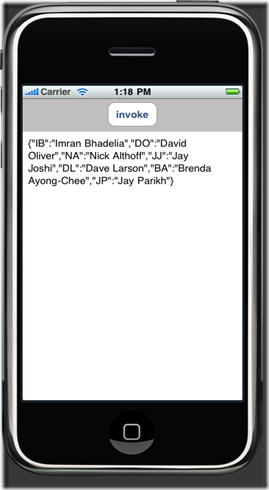
Once you parse the response it will look like following.
You can also call operation contract having parameters, for that need to create proper message and then add it in SOAP-BODY that will work.


