Search

Showing posts with label T-SQL. Show all posts

Dec 16, 2008

String Concatenation in SQL Group By clause

I got one problem in Ahmedabad SQLServer UserGroup.

The problem was something like... there are grouped data and requirement was making sum of string collection, means concatenation of string which are in the same group. Here is the question along with solutionSource Table

Field1     Field2
---------- ----------
Group 1 Member 1
Group 1 Member 2
Group 1 Member 3
Group 2 Member 1
Group 2 Member 2
Group 3 Member 1
Group 3 Member 2


Need output as

Field1     Field2
---------- ----------------------------
Group 1 Member 1,Member 2,Member 3
Group 2 Member 1,Member 2
Group 3 Member 1,Member 2


Solution:

SET NOCOUNT ON

--Creating Tables
DECLARE @Fields AS TABLE
(
Field1 VARCHAR(10),
Field2 VARCHAR(10)
)

--Inserting some values
INSERT INTO @Fields VALUES ('Group 1','Member 1')
INSERT INTO @Fields VALUES ('Group 1','Member 2')
INSERT INTO @Fields VALUES ('Group 1','Member 3')
INSERT INTO @Fields VALUES ('Group 2','Member 1')
INSERT INTO @Fields VALUES ('Group 2','Member 2')
INSERT INTO @Fields VALUES ('Group 3','Member 1')
INSERT INTO @Fields VALUES ('Group 3','Member 2')

--T-Sql
SELECT Field1, Substring(Field2, 2, LEN(Field2)) AS Field2 FROM
(
SELECT
[InnerData].Field1,
(SELECT ',' + Field2 FROM @Fields WHERE Field1=[InnerData].Field1 FOR XML PATH('')) AS Field2
FROM
(
SELECT DISTINCT Field1 FROM @Fields
) AS [InnerData]
) AS OuterData

Display multiple comma separated value into single column output Part II

Here is the data:

Field1      Field2
----------- --------------------
1 A,B,C
2 A
3 D,G


And we need output as following

Field1               ID
-------------------- ----
1 A
1 B
1 C
2 A
3 D
3 G

Lets create data first.

DECLARE @Fields AS TABLE
(
Field1 INT,
Field2 VARCHAR(20)
)

INSERT INTO @Fields VALUES (1,'A,B,C')
INSERT INTO @Fields VALUES (2,'A')
INSERT INTO @Fields VALUES (3,'D,G')

Here is the query for getting expected result.

SET @AnswerXML =
REPLACE(REPLACE((SELECT
Field1, '<Ids><Id value="' + REPLACE(Field2, ',','" /><Id value="') + '" /></Ids>'
FROM @Fields
FOR XML PATH ('F')
), '&lt;', '<'), '&gt;', '>')

SELECT
Answer.value('Field1[1]', 'BIGINT') as Field1
,y.value('@value[1]', 'VARCHAR(1)') AS ID
FROM
@AnswerXML.nodes('/F') p(Answer)
OUTER APPLY Answer.nodes('Ids/Id') o(y)

Also check Display multiple comma separated value into single column output Part I

Nov 28, 2008

Display multiple comma separated value into single column output

Here is the data:

Field1      Field2
----------- --------------------
1 A,B,C
2 A
3 D,G

And we need output as following


output
------
A
B
C
A
D
G

Lets create data first.

DECLARE @Fields AS TABLE
(
Field1 INT,
Field2 VARCHAR(20)
)

INSERT INTO @Fields VALUES (1,'A,B,C')
INSERT INTO @Fields VALUES (2,'A')
INSERT INTO @Fields VALUES (3,'D,G')

Here is the query for getting expected result.


DECLARE @FieldXml AS XML

DECLARE @v VARCHAR(MAX)

--Creates single row for Field2
SELECT @v = (SELECT ',' + Field2 FROM @Fields FOR XML PATH(''))
--Remove the first comma
SELECT @v = SUBSTRING(@v, 2, LEN(@v))

--Add the XML tag
SELECT @FieldXml = '<F value="' + REPLACE(@v , ',', '" /><F value="') + '" />'

--List single attribute value
SELECT x.value('@value', 'VARCHAR(1)') AS [output]
FROM @FieldXml.nodes('/F') p(x)

Oct 8, 2008

Finding nth maximum number in SQL Server 2005

This is the frequent requirement for the developer to find the nth max number from the table. It will easy to get it if you are using SQL Server 2005, as its allows us to make the top query variable.

Please read the Flexibility using TOP clause in SQL Server 2005 for more details.

Lets say, we are having student and their marks, and we want the nth max mark. First will see the table structure and will add few data into it.


SET NOCOUNT ON
DECLARE @Marks TABLE
(
StudName VARCHAR(100),
Mark INT
)

INSERT INTO @Marks VALUES('AAAAA', 55)
INSERT INTO @Marks VALUES('BBBBB', 65)
INSERT INTO @Marks VALUES('CCCCC', 59)
INSERT INTO @Marks VALUES('DDDDD', 52)
INSERT INTO @Marks VALUES('FFFFF', 65)
INSERT INTO @Marks VALUES('EEEEE', 95)

SELECT Mark FROM @Marks ORDER BY Mark DESC

Mark
-----------
95
65
65
59
55
52

Now we write the query which allow us to find nth max mark form this list.


DECLARE @Top INT
SET @Top = 2

SELECT MIN(Mark) AS 'Top' FROM(
SELECT DISTINCT TOP (@Top) Mark FROM @Marks ORDER BY Mark DESC) A

Top
-----------
65

@Top is variable; which gives you the ability to fetch Nth max.

Jul 22, 2008

OUTPUT CLAUSE (Transact-SQL)

How to know your INSERT UPDATE or DELETE statement effect how much recoreds? Or what if I need the list of identity values which get generated by INSERT statements?

One way is before insert I should get the MAX ID; after sucessfull insert again I get the ID and select the ID which are in betwwen them, like...


DECLARE @MinId INT 2: DECLARE @MaxId INT
 
SELECT @MinId = MAX(ID) from SearchResult
 
INSERT INTO SearchResult(Keyword, Hits)
SELECT Keyword, Hits FROM TmpTable
 
SELECT @MaxId = MAX(ID) from SearchResult
 
SELECT ID FROM SearchResult WHERE ID > @MinID AND <= @MaxID
But the result will not always true, like in the world of multitasking, what if some other insert also take place??

Now? How can we get all the newly added or created identities?

The other and best way is using OUTPUT CLAUSE. Here we go...

DECLARE @IDTable Table
{
Id BIGINT
}
 
INSERT INTO SearchResult(Keyword, Hits)
OUTPUT INSERTED.ID INTO @IdTable

SELECT Keyword, Hits FROM TmpTable
The inserted IDs will be in magic table called INSERTED, and by using OUTPUT CLAUSE we can grab it and save it to temp table or temporary variable... from there we can select the newly added IDs, like..

SELECT ID FROM @IDTable

Read more on OUTPUT CLAUSE

Jun 24, 2008

Using SP_EXECUTESQL

What we can do with EXECUTE?

With EXECUTE you can build the complicate query which contains the replacement of parameters values run time. Just imagine the situation where you have only single query which needs to get run 3-4 times; each time the substitution is taking place?

Have a look at the following query; which requires running twice and also substituting the values.

/* Following by using EXEC*/

DECLARE @AcTypeID nvarchar(40)
DECLARE @SQLString NVARCHAR(500)
DECLARE @ParmDefinition NVARCHAR(500)
DECLARE @Gender int

/* Specify the parameter value*/
SET @AcTypeID = 1
set @Gender = 1

/* Build the SQL string*/
SET @SQLString = 'SELECT count(*) as TotalUserByAccount FROM [User] WHERE AccountTypeId = ' + CAST( @AcTypeID as NVARCHAR(10))
SET @SQLString = @SQLString + ' And Gender = ' + CAST(@Gender as NVARCHAR(1))

/* Execute the same string*/
EXEC(@SQLString)

/* Specify the parameter value*/
SET @AcTypeID = 5
set @Gender = 0

/* Build the SQL string AGAIN*/
SET @SQLString = 'SELECT count(*) as TotalUserByAccount FROM [User] WHERE AccountTypeId = ' + CAST( @AcTypeID as NVARCHAR(10))
SET @SQLString = @SQLString + ' And Gender = ' + CAST(@Gender as NVARCHAR(1))

/* Execute the same string*/
EXEC(@SQLString)


So this is the first problem with EXECUTE?command, now next problem; it does not generate execution plans which are more likely to be reused by SQL Server. So the performance is not good if we have such query execute frequent.

Now, using SP_EXECUTESQL we can overcome both of above mentions problem. SP_EXECUTESQL gives you the possibility to use parameterized statements, EXECUTE does not. Parameterized statements gives no risk to SQL injection and also gives advantage of cached query plan. I will show you the cached query plan too.

First here is the query.

/* Now lets use sp_executesql */

DECLARE @AcTypeID nvarchar(40)
DECLARE @Gender nvarchar(40)
DECLARE @SQLString NVARCHAR(500)
DECLARE @ParmDefinition NVARCHAR(1000)

/* Build the SQL string once. */
SET @SQLString = N'SELECT count(*) as TotalUserByAccount FROM [User] WHERE AccountTypeId = @paramAcTypeID and Gender = @paramGender'

/* Specify the parameter format once. */
SET @ParmDefinition = N'@paramAcTypeID bigint, @paramGender int'

/* Set the param value */
set @Gender = 1
SET @AcTypeID = 1

/* Execute the query */
EXECUTE sp_executesql @SQLString, @ParmDefinition,
@paramAcTypeID = @AcTypeID, @paramGender = @Gender

/* set only param value again*/
set @Gender = 0
SET @AcTypeID = 5

/* Execute the query */
EXECUTE sp_executesql @SQLString, @ParmDefinition,
@paramAcTypeID = @AcTypeID, @paramGender = @Gender
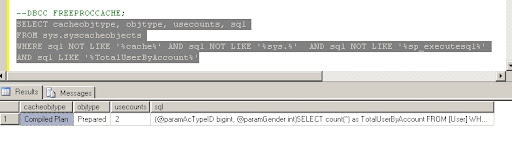
Now let’s check our Cache Objects of SQL Server, [I used DBCC FREEPROCCACHE first so its cleare all the cache plan and run the query]


Now the thing that I like most; getting OUTPUT variable by using SP_EXECUTESQL, here are the code for getting variable as OUTPUT.

/* Variable declaration */
DECLARE @UserID uniqueidentifier
DECLARE @UserName nvarchar(40)
DECLARE @SQLString NVARCHAR(500)
DECLARE @ParmDefinition NVARCHAR(1000)

/* Build the SQL string*/
SET @SQLString = N'SELECT @paramUserID = UserID FROM [User] WHERE FavUserName = @paramUserName'

/* Specify the parameter format once. */
set @ParmDefinition = N'@paramUserName nvarchar(40), @paramUserID uniqueidentifier output'

/* Execute the string with the parameter value. */
EXECUTE sp_executesql @SQLString, @ParmDefinition,
@paramUserName = 'imran786', @paramUserID = @UserID OUTPUT

/* Get the output value */
print @UserID


One of the limitations of SP_EXECUTESQL in SQL Server 2000 was that the input code string was practically limited to 4000 characters. This limitation is not relevant anymore because you can now provide sp_executesql with an NVARCHAR(MAX) value as input. Note that SP_EXECUTESQL supports only Unicode input—unlike EXEC which supports both regular character and Unicode input.

Read more...

Jun 23, 2008

Procedure to generate C# Class file


-- =============================================
-- Description: Generates C# class code for a table
-- and fields/properties for each column.
-- Run as "Results to Text" or "Results to File" (not Grid)
-- Example: EXEC usp_TableToClass 'MyTable'
-- =============================================

set ANSI_NULLS ON
set QUOTED_IDENTIFIER ON
GO
CREATE PROCEDURE [dbo].[usp_TableToClass]
@table_name SYSNAME
AS

SET NOCOUNT ON

DECLARE @temp TABLE
(
sort INT,
code TEXT
)

INSERT INTO @temp
SELECT 1, 'public class ' + @table_name + CHAR(13) + CHAR(10) + '{'

INSERT INTO @temp
SELECT 2, CHAR(13) + CHAR(10) + '#region Constructors' + CHAR(13) + CHAR(10)

INSERT INTO @temp
SELECT 3, CHAR(9) + 'public ' + @table_name + '()'
+ CHAR(13) + CHAR(10) + CHAR(9) + '{'
+ CHAR(13) + CHAR(10) + CHAR(9) + '}'

INSERT INTO @temp
SELECT 4, '#endregion' + CHAR(13) + CHAR(10)

INSERT INTO @temp
SELECT 5, '#region Private Fields' + CHAR(13) + CHAR(10)

INSERT INTO @temp
SELECT 6, CHAR(9) + 'private ' +

CASE
WHEN DATA_TYPE LIKE '%CHAR%' THEN 'string '
WHEN DATA_TYPE LIKE '%INT%' THEN 'int '
WHEN DATA_TYPE LIKE '%DATETIME%' THEN 'DateTime '
WHEN DATA_TYPE LIKE '%BINARY%' THEN 'byte[] '
WHEN DATA_TYPE = 'BIT' THEN 'bool '
WHEN DATA_TYPE LIKE '%TEXT%' THEN 'string '
ELSE 'object '
END + '_' + COLUMN_NAME + ';' + CHAR(9)
FROM INFORMATION_SCHEMA.COLUMNS
WHERE TABLE_NAME = @table_name
ORDER BY ORDINAL_POSITION

INSERT INTO @temp
SELECT 7, '#endregion' +
CHAR(13) + CHAR(10)

INSERT INTO @temp
SELECT 8, '#region Public Properties' + CHAR(13) + CHAR(10)

INSERT INTO @temp
SELECT 9, CHAR(9) + 'public ' +
CASE
WHEN DATA_TYPE LIKE '%CHAR%' THEN 'string '
WHEN DATA_TYPE LIKE '%INT%' THEN 'int '
WHEN DATA_TYPE LIKE '%DATETIME%' THEN 'DateTime '
WHEN DATA_TYPE LIKE '%BINARY%' THEN 'byte[] '
WHEN DATA_TYPE = 'BIT' THEN 'bool '
WHEN DATA_TYPE LIKE '%TEXT%' THEN 'string '
ELSE 'object '
END + COLUMN_NAME +
CHAR(13) + CHAR(10) + CHAR(9) + '{' +
CHAR(13) + CHAR(10) + CHAR(9) + CHAR(9) +
'get { return _' + COLUMN_NAME + '; }' +
CHAR(13) + CHAR(10) + CHAR(9) + CHAR(9) +
'set { _' + COLUMN_NAME + ' = value; }' +
CHAR(13) + CHAR(10) + CHAR(9) + '}'
FROM INFORMATION_SCHEMA.COLUMNS
WHERE TABLE_NAME = @table_name
ORDER BY ORDINAL_POSITION

INSERT INTO @temp
SELECT 10, '#endregion' +
CHAR(13) + CHAR(10) + '}'

SELECT code FROM @temp
ORDER BY sort

Jun 17, 2008

APPLY Clause in SQL Server 2005


select ClientId, Birthday from
(select top 10 Clnt.* from [Client] Clnt
inner join CaseClient CC on Clnt.ClientId = CC.ClientID
inner join [Case] C on C.CaseID = CC.CaseID order by Clnt.ClientID) as Result
This is the query which returns me the ClientId and Birthday; its TOP 10 Clients.

select Clnt.ClientId, Birthday, TopData.FormNumber from
(select top 10 Clnt.* from [Client] Clnt
inner join CaseClient CC on Clnt.ClientId = CC.ClientID
inner join [Case] C on C.CaseID = CC.CaseID order by Clnt.ClientID) as Result
inner join
(select TOP (3) * from ClientSession where ClientSession.ClientID = Result.ClientId) TopData
on TopData.ClientID = Result.ClientID
What I am trying to do here is… there is multiple sessions for one client, and form that multiple I need top 3 rows and its FormNumner. The above query will syntactically right, parser will not generate any error; but it will at compile time it will throw error

Msg 4104, Level 16, State 1, Line 1
The multi-part identifier "Result.ClientId" could not be bound.
Msg 4104, Level 16, State 1, Line 1
The multi-part identifier "Clnt.ClientId" could not be bound.

For correlated Join; Result is not defined.

So here is the solution with SQL Server 2005's new APPLY clause. The APPLY clause let's you join a table to a table-valued-function. That let's you write a query like this:

select Result.ClientID, Result.Birthday, TopData.FormNumber from
(select top 10 Clnt.* from [Client] Clnt
inner join CaseClient CC on Clnt.ClientId = CC.ClientID
inner join [Case] C on C.CaseID = CC.CaseID order by Clnt.ClientID) as Result
CROSS/span> Apply
fn_GetTopClientSession(Result.ClientId, 3) AS TopData

And here is the expected output

ClientID Birthday FormNumber
----------- ----------------------- -----------
46 1990-01-01 00:00:00.000 11094
46 1990-01-01 00:00:00.000 11062
46 1990-01-01 00:00:00.000 30211
52 1983-01-04 00:00:00.000 11159
52 1983-01-04 00:00:00.000 11155
52 1983-01-04 00:00:00.000 30190
53 2000-01-01 00:00:00.000 11154
53 2000-01-01 00:00:00.000 11158
53 2000-01-01 00:00:00.000 11157
68 2000-01-01 00:00:00.000 10104
68 2000-01-01 00:00:00.000 12168
68 2000-01-01 00:00:00.000 11215
73 1957-10-09 00:00:00.000 11137
73 1957-10-09 00:00:00.000 32464
73 1957-10-09 00:00:00.000 11150


And here is the function

CREATE FUNCTION dbo.fn_GetTopClientSession(@ClientId AS int, @n AS INT)
RETURNS TABLE
AS
RETURN
select TOP (@n) * from ClientSession where ClientSession.ClientID = @ClientId
GO

I just put the Correlated Join query inside the Function, nothing more.

You can see the APPLY clause acts like a JOIN without the ON clause!!!

There are two flavors of APPLY clause, CROSS and OUTER. The OUTER APPLY clause returns all the rows on the left side whether they return any rows in the table-valued-function or not. The columns that the table-valued-function returns are null if no rows are returned. The CROSS APPLY only returns rows from the left side f the table-valued-function returns rows.

Notice that I'm just passing in the ClientId to the function. It returns the TOP 3 rows based on the amount of the order. Since I'm using CROSS APPLY a Cases without Client won't appear in the list. I can also pass in a number other than 3 to easily return a different number of Cases per Client. So I could list the top 5. How cool is that?!?

Jun 16, 2008

Flexibility using TOP clause in SQL Server 2005

Hello all,

Upto now we know that how to use TOP clause in Sql Server 2000 . SQL Server 2005 come up with more flexible way to use TOP clause.

Here is the simple way to get TOP 10 [or say 'n' a dynamic number] from a table.

DECLARE @Rows INT
SET @Rows = 10

SELECT TOP ( @Rows ) *
FROM TempMaster
This will return the top 10 rows from TempMaster. You can also replace @Rows with anything that evaluates to a number.

Now look at the following query; its odd but runs just fine:

SELECT TOP ( SELECT COUNT(*) FROM TempMaster ) *
FROM TempDetails
You can also use the TOP clause for INSERT, UPDATE and DELETE statements. If you wanted to DELETE in batches of 500 you can now do that using the TOP clause.

May 7, 2008

Converting row to column in Sql Server 2005

Consider the following data and our target is to have all the ClientId starting form 247 to 252 will be in column
name Client1, Client2... etc. 
UserID      CaseID      CaseNumber  ClientID
----------- ----------- ----------- -----------
80 216 1087 247
80 216 1087 248
80 216 1087 249
80 216 1087 250
80 216 1087 251
80 216 1087 252
80 276 1140 328
80 277 1143 329
80 347 1191 438
80 348 1192 439

SQL Server 2005 introduced Ranking, Partitioning and Pivoting. By using all togather
we can achive our goal.


Ranking functions that provide the ability to rank a record within a partition. 
In this case, we can use RANK() to assign a unique number for each record, and partition
by the ClientID (so that the RANK will reset for each ClientID)

By prefixing some text to the rank number, we end up with something like:


SELECT UserID, C.CaseID, CaseNumber, ClientID, 
'ClientId' + CAST(
RANK() OVER (
PARTITION BY C.CaseID, CaseNumber
ORDER BY ClientID) AS VARCHAR(10)) ClientIdListing
FROM [Case] C, CaseClient CC
WHERE C.CaseId = CC.CaseID AND USerID = 80

Result:


UserID      CaseID      CaseNumber  ClientID    ClientIdListing
----------- ----------- ----------- ----------- ------------------
80 216 1087 247 ClientId1
80 216 1087 248 ClientId2
80 216 1087 249 ClientId3
80 216 1087 250 ClientId4
80 216 1087 251 ClientId5
80 216 1087 252 ClientId6
80 276 1140 328 ClientId1
80 277 1143 329 ClientId1
80 347 1191 438 ClientId1
80 348 1192 439 ClientId1

The new column (ClientIdListing) is the concatenation of the literal string "ClientId"
and the string representation of the number that the RANK function returned. But
the bigger point is that now this column can be used for pivoting, and result in
a series of new columns called [ClientId1], [ClientId2], [ClientId3], etc.


Pivoting in SQL Server 2005 requires explicit declaration of values as a column
list. In this case, we can't just say "Pivot on the ClientIdListing column", but
rather must say "Pivot on the ClientIdListing column, and make new columns only
for these specific values". This restriction is a little bit of a downside because
we need knowledge of the values in the column. Or, in this case, we need to know
how many ClientIds a Case could possibly have so that we create enough columns in
the result.


So here is the final query:

SELECT * FROM
(SELECT UserID, C.CaseID, CaseNumber, ClientID, 'ClientId'
+ CAST(RANK() OVER (PARTITION BY C.CaseID, CaseNumber
ORDER BY ClientID)
AS VARCHAR(10)) ClientIdListing
FROM [Case] C, CaseClient CC
WHERE C.CaseId = CC.CaseID
AND USerID = 80) P

PIVOT
(MAX(ClientID) FOR ClientIdListing IN
(ClientID1, ClientID2, ClientID3, ClientID4, ClientID5, ClientID6)
) AS Clients

And here is the Output:


UserID CaseID CaseNumber ClientID1 ClientID2 ClientID3 ClientID4 ClientID5 ClientID6
----------- ----------- ----------- ----------- ----------- ----------- ----------- ----------- -----------
80 216 1087 247 248 249 250 251 252
80 276 1140 328 NULL NULL NULL NULL NULL
80 277 1143 329 NULL NULL NULL NULL NULL
80 347 1191 438 NULL NULL NULL NULL NULL
80 348 1192 439 NULL NULL NULL NULL NULL

Mar 26, 2008

May 3, 2007

Avoid dynamic query at some extend [SQL 2k]


select * from [northwind].[dbo].[orders]
This will probably returns 830 rows [thats default],

Now what if I want top 10 rows or to 20 rows may be more, I will create dynamic query like...
declare @statement varchar(100)
declare @iTop int
set @iTop=3
set @statement ='select top ' + convert(varchar(2),@iTop) + ' * from [northwind].[dbo].[orders]'
EXEC (@statement)
We can do as follows which don't requrie creating dynamic query.

declare @iTop int
set @iTop=3
set rowcount @iTop
select * from [northwind].[dbo].[orders]
This will display top 3 records!!

Now set rowcount to 0 to get all the records

set rowcount 0